

Key Highlights
- How to Check GDRFA Dubai Visa Status Online?
- How to Check GDRFA Visa Status by Passport Number?
- What Details Are Required for a GDRFA Visa Status Check?
- How to Check GDRFA Visa Application Status?
- How to Check GDRFA Visa Status Using an Application or Reference Number?
- How to Check GDRFA Visa Validity and Expiry Date?
- What Do GDRFA Visa Status Results Mean?
- What to Do If Your Passport Number Is Not Found on GDRFA?
- How to Contact GDRFA If You Cannot Check Your Visa Status?
- Conclusion
The methods for checking the GDRFA visa status of a Dubai-issued visa through GDRFA (General Directorate of Residency and Foreigners Affairs) in 2026 include online platforms as well as by passport. The ways in which the status of the Dubai-issued visa can be checked through the GDRFA (General Directorate of Residency and Foreigners Affairs) in 2026 are online platforms and passport. The applicants can check the validity of visas or residence by entering the relevant details of their passport, nationality, date of birth, etc., or, as applicable, from the service, the number of the application submitted on the GDRFA Dubai website or the number of the application filed, transaction number, and date of payment on the GDRFA Dubai website (gdrfad.gov.ae) or its Mobile App. Passport-number searches are successful for status and fines queries; however, some application-tracking modes require the full receipt particulars (application number, transaction number, and payment date), and having your visa paperwork by yourself guarantees a smooth, mistake-free check.
How to Check GDRFA Dubai Visa Status Online?
Here are on how to check your GDRFA Dubai visa status online, using the official GDRFA inquiry service:
-
On the official website of GDRFA Dubai, gdrfad.gov.ae, click on the Visa Status or GDRFA inquiry service. This is the official website for checking the status of GDRFA Dubai visas and entry permits issued by Dubai.
-
Where available, use the GDRFA visa status check by passport number: enter passport number, nationality, and date of birth to see what type of visa you have and if the visa is valid, when it was issued, and when it expires.
-
Use a new visa application for a new application via the Application Status Tracker. The application number, transaction number, and payment date are typically required for this GDRFA visa status check.
-
If you have a Dubai residence visa, you must verify the visa with the file details. You may need to provide your first name, file number, country, and date of birth when the GDRFA Dubai visa check is conducted; make sure to match your passport.
-
Fill in the CAPTCHA and click the submit button. Once you have filled in the GDRFA visa status form, the portal displays the status of your application and/or the validity of your visa in real time.
-
Use the GDRFA Dubai app as an alternative. Within the app, click on Services, Residence Status / Entry Permit or Residence Inquiry, and then input the necessary passport or visa information for your GDRFA Dubai visa status inquiry.
-
If the result is not clear, please contact GDRFA. If the GDRFA visa status check by passport number doesn't provide a result, it's helpful to call Dubai visas on UAE line 800 5111 or from abroad +971 4 313 9999.
Please use the official website or application of GDRFA for checking visa (gdrfad.gov.ae) and do not use unofficial websites which request payment or personal information.
Also Read: How to Check UAE Visa Ban Status with Passport Number?
How to Check GDRFA Visa Status by Passport Number?
-
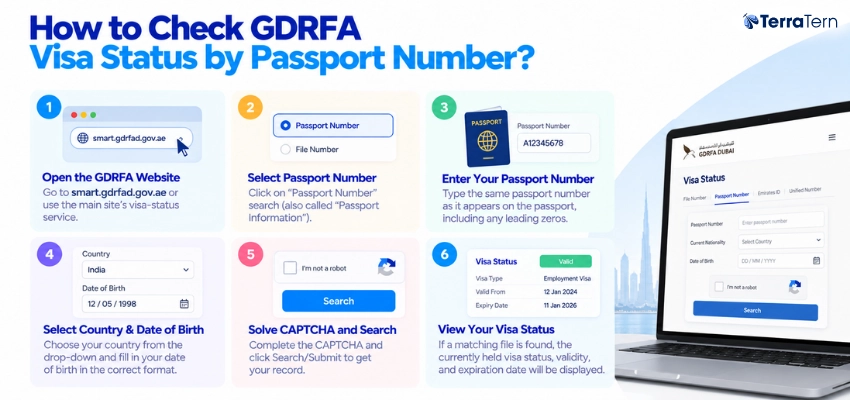
Open the GDRFA Dubai visa status page at smart.gdrfad.gov.ae or via the main site’s visa-status service.
-
Click on “Passport Number” search (also called “Passport Information”).
-
Please enter the same passport number as it appears on the passport, including any leading zeros.
-
Choose your country from the drop-down and fill in your date of birth in the correct format.
-
Click Search/Submit to get your record; you should solve the CAPTCHA.
-
If a matching file is found, the currently held visa status, validity, and expiration date will be displayed.
What Details Are Required for a GDRFA Visa Status Check?
-
Passport number (Please include leading zeros if applicable)
-
Passport nationality (should be in accordance with the visa file).
-
Date of Birth – as requested by the portal (DD/MM/YYYY or similar).
-
For any application tracking: application/receipt number given on the receipt.
-
For application-based: transaction number attached to the application, and payment date attached to the same.
-
A valid security code that you need to enter during the security verification step.
Also Read: How to Check Visa Status Australia? Online & Offline
How to Check GDRFA Visa Application Status?
-
Go to the GDRFA Dubai website (gdrfad.gov.ae) and click on the visa/application status service.
-
Verify that you have selected an “Application Number” or other tracking feature (not passport search).
-
Please input your application/rep. number as it appears on your payment receipt/acknowledgment.
-
Enter the transaction number and date when asked.
-
Fill out the CAPTCHA and submit the application form to get your application's current phase.
-
The outcome will show if an application is being processed, approved, issued, rejected, or cancelled.
How to Check GDRFA Visa Status Using an Application or Reference Number?
To find out the status of your GDRFA visa, you can use an application or reference number, with the following to check:
-
Visit the official GDRFA Dubai visa status website at https://smart.gdrfad.gov.ae/Public_Th/StatusInquiry_New.aspx. It's the official Dubai visa status check service of GDRFA.
-
Choose the “Application” search option. The application number, transaction number, and payment date are usually required to perform a visa status check GDRFA by application number.
-
Please write the Application Number as it appears on your visa application receipt or confirmation message. The number is your unique GDRFA Dubai visa check request.
-
Enter the transaction number and payment date. For this GDRFA visa status check, the transaction number is not the same as the number of the application, and the payment date must be in DD-MM-YYYY (for example, 12-12-2013).
-
Fill in the security information and click on “Search.” This will then display on the portal if the Dubai visa application is still pending, approved, denied, or if the Dubai visa has been issued.
-
Use the Application Status Tracker to check by reference number. To view the status, make sure you use the official GDRFA tracker and enter the current application reference number and fill out the email verification.
-
Check the passport number only when there is no information about the application. The application/reference-number check is best for tracking a pending GDRFA Dubai visa status, whereas the GDRFA visa status check by passport number is used to check a visa's validity.
-
Save the application confirmation, transaction receipt, and payment date until the visa check from GDRFA is finished, as these documents contain the essential information needed to track the visa.
Also Read: How to Check UAE Visa Status with Passport Number?
How to Check GDRFA Visa Validity and Expiry Date?
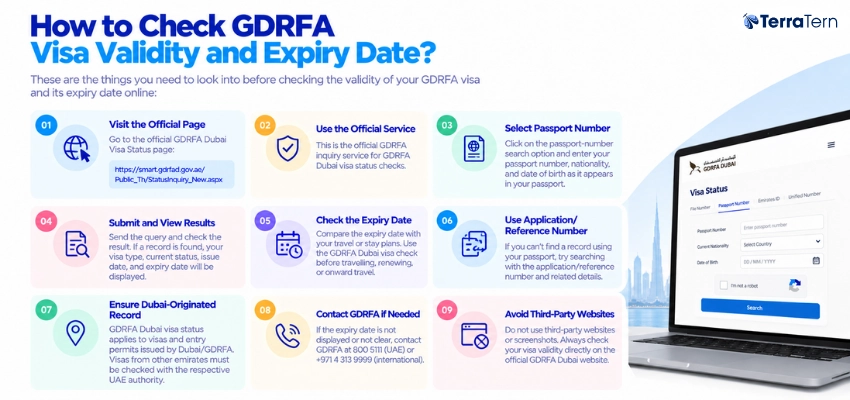
These are the things you need to look into before checking the validity of your GDRFA visa and its expiry date online:
-
You need to visit the official GDRFA Dubai Visa Status page, which is https://smart.gdrfad.gov.ae/Public_Th/StatusInquiry_New.aspx.
-
This is the official GDRFA inquiry service** for GDRFA Dubai visa status checks.
-
Click on the passport-number search option. To check GDRFA visa status by passport number, you must input your passport number, nationality, and date of birth as it appears in your passport.
-
Send the query and look at the answer. If the record is available, the type of visa you have, current status, issue date, and expiry date will appear on the GDRFA visa status page.
-
Be sure to compare the expiration date with your travel or stay plans. To check if a visa or residence visa is still valid before travelling, renewing, or onward travelling, the GDRFA Dubai visa check is a service provided.
-
If a search is not possible in the passport, please use the application/Reference number. The visa status check GDRFA portal also enables you to search by application/reference number and related information when the search by passport number option doesn't yield anything.
-
Check that it's a Dubai-originated record. A GDRFA Dubai visa status is applicable to visas and entry permits issued by Dubai/GDRFA; visas issued by other emirates might require checking with the relevant UAE authority.
-
If the expiry date is not present or not legible, please contact GDRFA. If your GDRFA visa check fails to display a validity/expiry date, please contact 800 5111 in the UAE or +971 4 313 9999 internationally.
-
Avoid using any third-party websites or screenshots of the GDRFA visa status check website, as the current validity will be provided directly from GDRFA Dubai.
What Do GDRFA Visa Status Results Mean?
-
Active/Valid: Your visa/résidence file is still valid and in force until the expiry date indicated.
-
Expires: The validity period has expired; you may have to exit/renew, or you might have to pay an overstay fine.
-
Process: The application is still under review by GDRFA, and no final decision made yet.
-
Approved/Issued: Your visa has been approved and either printed or attached to your passport/UID.
-
Declined: Application was refused; this could be due to documentation problems or eligibility issues.
-
Cancelled: Residence/visa file has been cancelled for some reason (e.g., job change, sponsorship change, absconding, etc.).
Also Read: Dubai Visa Check Online by Passport Number
What to Do If Your Passport Number Is Not Found on GDRFA?
If your GDRFA visa status by passport number search shows that it's not found, here's what you should do:
-
Ensure that you are working with the right portal. GDRFA visa status check is only relevant for visas issued by Dubai/GDRFA; if they are issued by another emirate or ICP, then the GDRFA visa status check may not be able to find your visa.
-
Please re-enter your passport number as it appears. To verify GDRFA visa status by passport number, eliminate all spaces or dashes, add leading zeros, and if the passport has been renewed, use the current one.
-
Verify country of origin and birthdate. Choose your nationality from the drop-down and type your date of birth in the date format (DD-MM-YYYY). The GDRFA Dubai visa status search even fails in case of a small mismatch.
-
Use an official search technique! If the GDRFA visa status by passport number option does not work, then follow the official GDRFA inquiry service, using your application/reference number, transaction number, and payment date or residence file number.
-
Verify if the visa has been cancelled or expired. Can't be displayed when the entry permit or residence visa is expired, cancelled or the record is not longer valid, consult the official GDRFA visa status check portal to check the latest visa record.
-
If the application is recent, wait a bit before trying again. The visa check database of GDRFA Dubai might not show the visa if it's recently submitted; please wait for the processing period mentioned by your sponsor/ travel agent/ Amer centre to see the visa.
-
If it does not work, please reach out to GDRFA Dubai directly. Please dial 800 5111 in the UAE or +971 4 313 9999 from abroad and have your passport, application number, transaction receipt, and visa copy on hand to help you with your GDRFA visa status.
-
Please avoid putting passport scans, visa copies, or personal details on unofficial websites that are not gdrfad.gov.ae or the official GDRFA Dubai app, which are designated for the “GDRFA visa check”.
How to Contact GDRFA If You Cannot Check Your Visa Status?
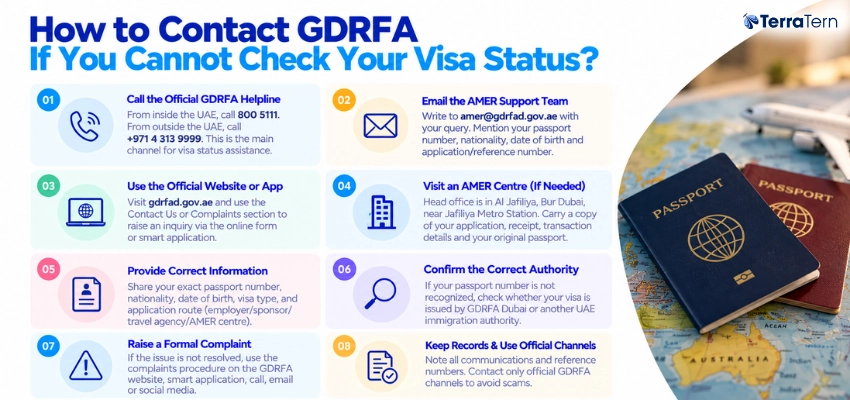
Below are points on how to reach out to GDRFA Dubai if you are unable to check your GDRFA visa status:
-
Dial the official GDRFA toll-free number. From inside the UAE, call 800 5111; from outside the UAE, call +971 4 313 9999. This is the primary avenue to obtain assistance when checking your GDRFA visa status or searching for a failed GDRFA visa status with your passport.
-
Send an email to the AMER support team. Please write your query to [email protected] and specify that your visa status is not available on the website, and mention your passport number, nationality, date of birth, and application or reference number.
-
Utilize the official website of GDRFA Dubai or the app. If your record is not available on the GDRFA inquiry service, contact us or the complaints section on gdrfad.gov.ae to submit and raise an inquiry via the online form or smart application.
-
If the problem is serious, go to an AMER centre. The head office of GDRFA is located in Al Jaffliya, Bur Dubai, close to the Metro Station at Jaffliya. Bring a copy of your application, in-person receipt, transaction details, and original passport for a Dubai visa check by GDRFA.
-
Be sure to fill in the proper information when contacting support. To check the GDRFA visa, please provide the exact passport number, nationality, date of birth, visa type, and visa application route (employer/sponsor/travel agency/Amer centre).
-
Inquire about the proper check-in system. In case the passport number is not identified, ask whether the visa is issued by Dubai GDRFA or another immigration authority of the UAE, as this could be the reason why your passport number is not recognized in the GDRFA visa status check.
-
Make a formal complaint if it is not resolved. If a GDRFA Dubai visa status is yet to be given despite contacting customer service, utilize the complaints procedure on the GDRFA website, smart application, call, email, or social media.
-
Note all communications and reference numbers until the visa check issue has been resolved with your GDRFA, and only contact your GDRFA via official contact numbers to prevent scams.
Also Read: How to Check UAE Visa Status Online by Passport Number?
Conclusion
Checking the GDRFA visa status of Dubai visas is a hassle-free process in 2026, especially for those with Dubai visas issued by the Government of Dubai's Ministry of Interior's Department of General Directorate of Foreign Affairs and Religious Affairs (DGRFA), as their passport-based online inquiry is the most convenient. You can check the status, validity, and expiry date of your visa by using the GDRFA Dubai portal (gdrfad.gov.ae) or its mobile application by entering your passport number, nationality, and date of birth. You can also track the visa application and provide the application/reference number, transaction number, and payment date. Knowing what each status result means (active, expired, under process, approved, rejected, cancelled) can enable you to act promptly on a renewal, travel plan, or to solve a problem; and the “not found” results may be easily resolved by checking data accuracy or using file-number searches. In case online approaches have not worked, GDRFA's helplines (800-5111 and +971 4 313 9999), Amer Centres and ICP Customer Happiness Centres offer both face-to-face and assisted support to verify your file and thereafter advise on the next steps.




 AI Summary